

New feature: Configuration Drift
Ensuring baseline compliance across multiple customer tenants just got easier. We are excited to introduce the Configuration Drift feature, designed to give MSPs continuous visibility and control over tenant configurations. With Configuration Drift, you can:
- Detect changes: Automatically monitor and identify any unauthorized or
accidental modifications to supported configuration types within your customer tenants. - Stay informed: Receive email alerts when configuration drift has been detected.
- Remediate changes: Quickly roll back unwanted changes and remediate the drifted configuration to its previous, compliant state directly from the tenant specific configuration drift timeline.
- Scheduled monitoring: Configuration drift scans are performed four times per day (every six hours), and drift history is retained for 90 days.
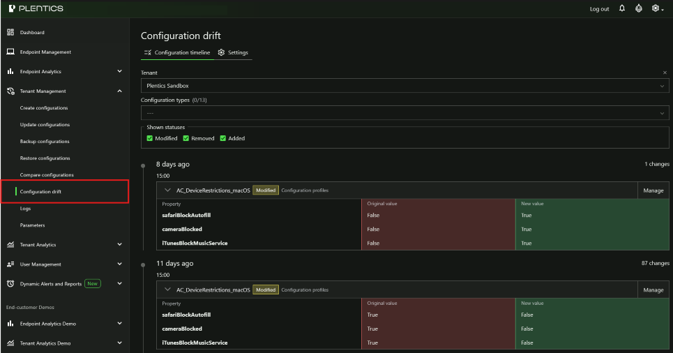
How to get started: Navigate to the Tenant Management -> Configuration Drift
page in Plentics Suite portal and enable configuration drift from the Settings tab.
Select target tenants for the setting and select which configuration types you want to monitor.
More supported configuration types
With this update, we’ve added even more supported configuration types to Tenant
Management. You can now manage SharePoint Online and Entra ID configurations with Plentics Suite.
For detailed information about supported settings, configuration requirements, and template tenant setup, see the Migratable policies and configurations document available in the Plentics Wiki.
Platform Improvements
- Configuration comparison logs are now stored and can be accessed from Logs page in Tenant Management.