

The latest Plentics Suite release introduces the following new features.
Tenant Management
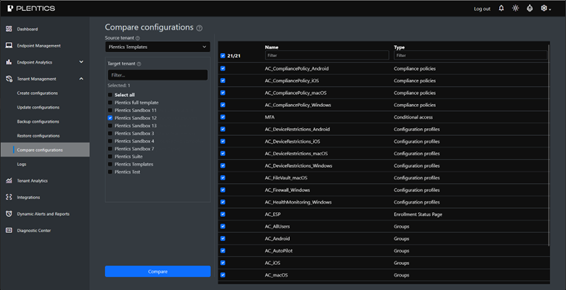
- Compare configurations feature added: This feature enables administrators to compare configuration data between tenants with clear visibility into differences and matching properties.
Key Capabilities
- New Menu Item: Compare Configurations now appears as a dedicated option in the Tenant Management menu.
- Tenant Selection: Works the same way as in Create and Update flows.
- Compare Action: The Compare button automatically verifies whether configurations exist in the selected target tenant(s) and compares property values between the source and target configurations.
- Clear filtering options are available.
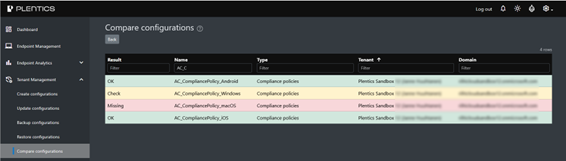
- Visual Indicators:
- A green indicates that the configuration exists in that tenant.
- A red highlight marks missing configurations.
- A yellow ‘Check’ status indicates that a configuration exists but may differ.
- Detail-level JSON Comparison:
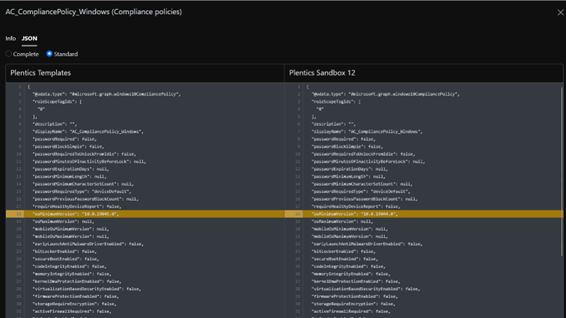
- The Info and JSON tabs provide an easy switch between formatted metadata and raw configuration data views.
- A side-by-side JSON view allows inspection of configuration content line by line and validation of detailed differences.
- Differences are highlighted for quick identification.
- Available in both Standard and Complete views for deeper insight.
Other Tenant Management improvements
- Enhancements have been made to improve visibility and usability in configuration creation within Tenant Management.
- When hovering over configuration assignments count in Create Configurations, a tooltip now shows which assignments are included (intent | group name).
- Improved workflow consistency across Create operations within Tenant Management.
Minor UI and checkbox logic corrections for more reliable configuration management. - Instructions for the Tenant Management details can be found in the Plentics Suite Wiki (Tenant Management – User guide).
- Improvements concerning automation, scalability, and error management of the service.
If the release is not functioning as expected, please refresh your browser.